Revenue-1

Pin a Google Drive document to the bookmarks bar

Sohail Ahmad


Any of the Google Drive documents from apps such as Docs, Sheets, and Slides can be pinned to the bookmarks bar. To do so, follow the steps below.
  1. Open Google Drive.
  2. Open the document you'd like to pin.
  3. Click the Bookmark this page The icon that allows users to bookmark a page. icon on the right side of the address bar.
  4. In the small window that appears, select Bookmarks bar from the drop-down menu.
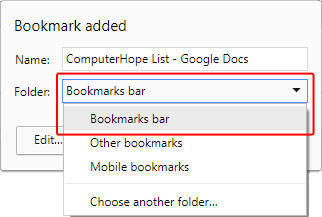
How to select the bookmarks bar option in Chrome.
  1. After you've selected Bookmarks bar, click the The Done button in Chrome. button.
  2. You should now see your document in the Bookmarks bar.

This image shows what the user should see if they've bookmarked their document correctly.

Getting Info...

إرسال تعليق

Cookie Consent
We serve cookies on this site to analyze traffic, remember your preferences, and optimize your experience.
Oops!
It seems there is something wrong with your internet connection. Please connect to the internet and start browsing again.
AdBlock Detected!
We have detected that you are using adblocking plugin in your browser.
The revenue we earn by the advertisements is used to manage this website, we request you to whitelist our website in your adblocking plugin.
Site is Blocked
Sorry! This site is not available in your country.